

Table of Contents
What UX/UI Design Is Best for an Online Client Portal or Resource Center
In today’s fast-paced financial world, accountants and their clients rely heavily on digital tools to manage finances efficiently. An online client portal or resource center serves as a central hub for sharing documents, tracking progress, and accessing insights. However, not all designs are created equal. The right UX/UI design can significantly enhance user satisfaction, reduce errors, and foster long-term client relationships. At PKRank, a digital marketing firm based in Melbourne, we specialise in crafting intuitive digital experiences tailored for industries like accounting. This article explores the best UX/UI design principles and practices for these platforms, helping you attract and retain clients seamlessly.
Understanding UX and UI in Client Portals
Before diving into specifics, it’s essential to distinguish between UX (User Experience) and UI (User Interface). UX focuses on the overall feel of the journey—how intuitive, efficient, and enjoyable the interaction is. UI, on the other hand, deals with the visual and interactive elements, such as buttons, layouts, and colour schemes. For an accountant’s client portal, where users handle sensitive data like tax returns and financial statements, both must prioritise clarity, security, and speed.
Transitioning from general concepts to practical application, consider that accountants’ clients range from small business owners to high-net-worth individuals. Their portals must accommodate varying tech-savviness levels. A poor design leads to frustration, abandoned sessions, and lost trust, while an optimal one streamlines workflows and positions your firm as a tech-forward leader.
Core Principles for Effective Design
The foundation of superior UX/UI lies in proven principles adapted for financial portals. First, simplicity reigns supreme—eliminate clutter to focus on core functions like document uploads, report downloads, and appointment scheduling. Accessibility ensures compliance with standards like WCAG, making portals usable for all, including those with disabilities.
Mobile responsiveness is non-negotiable, as over 50% of users access portals via smartphones. Progressive disclosure reveals information gradually, preventing information overload. Personalisation, such as custom dashboards showing client-specific KPIs, builds engagement. Finally, consistent feedback through loading indicators and success messages reassures users during data-heavy tasks.
Building on these principles, let’s examine specific best practices that differentiate top-performing portals.
Best Practices for Navigation and Layout
Effective navigation mimics familiar patterns users know from banking apps, reducing the learning curve. A persistent top navigation bar with icons for Home, Documents, Reports, Billing, and Support works wonders. Sidebars suit desktop views for quick access to sub-sections, while hamburger menus optimise mobile space.
For layouts, adopt a card-based system where each card represents a key action or metric—e.g., “Upcoming Deadlines” or “Recent Invoices.” Whitespace generously separates elements, enhancing readability for dense financial data. Dark mode options cater to late-night users, and high-contrast colours ensure legibility.
To illustrate key features, here’s a bulleted list of must-have elements:
- Search Functionality: Intelligent, predictive search across all documents and resources.
- Dashboard Customisation: Drag-and-drop widgets for personalised views.
- Secure File Sharing: Drag-and-drop uploads with real-time progress bars and encryption indicators.
- Notification Centre: In-portal alerts for deadlines, updates, and messages.
- Quick Actions Toolbar: One-click options like “Export PDF” or “Schedule Call.”
These elements not only improve usability but also boost client retention by making routine tasks effortless.
Comparing Design Approaches
Different design paradigms suit varying firm sizes and client bases. Material Design by Google emphasises tactile feedback with shadows and animations, ideal for modern, app-like portals. Apple’s Human Interface Guidelines promote minimalism and gesture-based interactions, perfect for premium clients.
Traditional web designs with tables and forms work for data-heavy accounting but feel dated. Hybrid approaches blending both offer the best of worlds. The following table compares popular frameworks:
| Framework | Strengths | Weaknesses | Best For |
|---|---|---|---|
| Material Design | Responsive, animated, familiar from Android | Can feel busy on data-dense pages | Growing firms targeting tech-savvy clients |
| Bootstrap | Quick implementation, customisable grids | Generic look without heavy styling | Small practices needing rapid deployment |
| Fluent Design (Microsoft) | Lightweight, acrylic effects for depth | Less mobile-optimised out-of-box | Enterprise-level portals with integrations |
| Custom Bespoke | Tailored to brand, unlimited flexibility | Higher cost and development time | Large firms with unique workflows |
As shown, selecting the right framework depends on your goals. For Melbourne-based accountants, Material Design strikes a balance, aligning with Australia’s progressive digital landscape.
Security and Trust in UX/UI
Financial portals demand robust security woven into the design. Visual cues like padlock icons on secure pages and biometric login options build trust. Two-factor authentication flows should be frictionless, perhaps using push notifications over SMS.
Error handling is crucial—inline validation for forms prevents submission mistakes, with helpful tooltips explaining issues. Audit logs accessible via a simple click reassure clients of data integrity. Integrating these seamlessly transitions users from concern to confidence.
Measuring Success and Iterating
Post-launch, analytics tools like Google Analytics or Hotjar reveal heatmaps and drop-off points. Key metrics include time-on-task, bounce rates, and Net Promoter Scores. A/B testing variations, such as button placements, refines the design iteratively.
Regular user feedback via in-app surveys ensures the portal evolves with client needs. PKRank has helped numerous Melbourne accounting firms achieve 30% higher engagement through data-driven UX/UI overhauls.
Conclusion
Optimising UX/UI for an online client portal or resource center is pivotal for accountants aiming to stand out in a competitive market. By embracing simplicity, responsiveness, and security-focused designs, your firm can deliver exceptional value. Partnering with experts like PKRank in Melbourne ensures your portal not only meets but exceeds client expectations, driving growth and loyalty. Implement these strategies today to transform your digital presence.
Empower Your Accounting Firm with PKRank’s Tailored Digital Solutions
Hey there, numbers whiz! Juggling tax seasons, client audits, and endless spreadsheets in Australia’s bustling business world can be a real grind, right? But imagine if your digital footprint could effortlessly draw in those ideal clients—without adding to your workload.
At PKRank, we’re passionate about keeping things straightforward, friendly, and super effective for accountants like you, whether you’re a solo advisor in Sydney’s financial heartland, guiding firms in Melbourne’s innovative startups, or thriving in Brisbane’s booming economy.
Envision a sleek, intuitive website crafted and developed specifically for you, highlighting your prowess in tax planning, bookkeeping, or financial advisory with crystal-clear sections that scream reliability. We’ll integrate secure document uploads and responsive design, so clients from Perth’s mining sector to Adelaide’s manufacturing hubs can access your services seamlessly on any device.
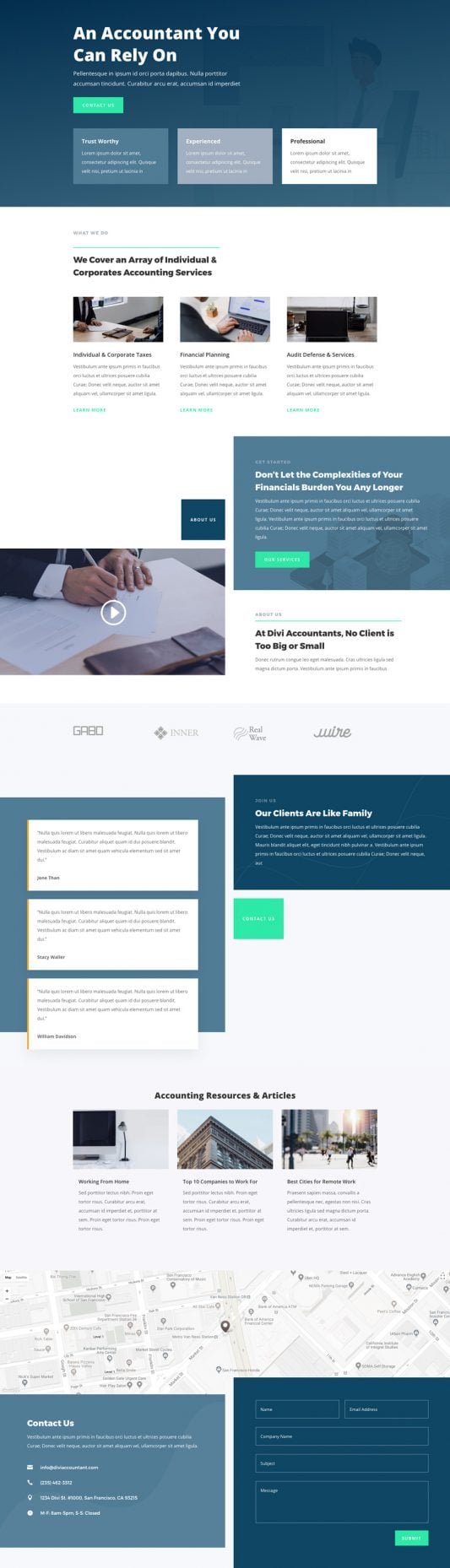
What UX/UI Design Is Best for an Online Client Portal or Resource Center?
Next up, our SEO experts will skyrocket your Google rankings, making sure you’re the go-to for searches like “tax accountant Melbourne” or “small business CPA Perth.” Say goodbye to scrolling invisibility and hello to steady organic leads from Canberra’s public sector pros or the Gold Coast’s tourism entrepreneurs!
We’ll take the reins on your social media too, with warm, relatable posts on LinkedIn and Facebook—think quick tips on EOFY prep, anonymized success tales, and polls that get your network buzzing. It’s all about building that trusted advisor vibe in communities from Hobart’s heritage businesses to Darwin’s remote enterprises.
For faster wins, our Google Ads and Facebook Ads are precision-tuned, zeroing in on Aussie businesses hungry for your expertise with savvy budgets that spark inquiries and cut the fluff—perfect for dense accounting scenes in Sydney and Melbourne.
We’re your cheerful sidekicks in growth, dedicated to outcomes that free you up for the numbers game you ace. Fancy a casual yarn over virtual brekkie? Swing by our website—let’s supercharge your firm into a client powerhouse together!


