

Table of Contents
In the bustling culinary landscape of Melbourne and beyond, efficiency and customer satisfaction are paramount, especially for businesses operating within the quick and easy e-commerce takeaway food sector. At PKRank, your dedicated digital marketing partners in Melbourne, we understand that a seamless online experience is not just a nice-to-have; it’s a critical driver of revenue and customer loyalty. This is where the power of User Experience (UX) and User Interface (UI) design truly shines. For a takeaway food site, the right UX/UI isn’t about aesthetic flourishes; it’s about stripping away friction, anticipating needs, and guiding customers effortlessly from their first click to their delicious doorstep delivery.
Understanding UX UI for Takeaway Food Sites
Before delving into specific design elements, it’s essential to grasp what UX and UI actually mean in the context of your e-commerce takeaway food website. User Experience (UX) design encompasses the entire journey a customer takes when interacting with your website. It’s about how they feel, what they perceive, and how easily they can achieve their goals, such as browsing menus, placing an order, and making a payment. A good UX design ensures that the process is intuitive, enjoyable, and efficient. It’s the invisible architecture that makes everything work smoothly.
User Interface (UI) design, on the other hand, refers to the visual and interactive elements of your website. This includes everything from the layout and colour scheme to typography, buttons, and imagery. UI is the tangible aspect of your digital presence, the actual ‘look and feel’ that users engage with. While UX focuses on the overall feeling and functionality, UI is responsible for presenting that functionality in an attractive and usable manner. For a takeaway food e-commerce site, effective UI design makes the UX accessible and appealing.
The synergy between UX and UI is crucial. A beautiful UI without good UX can be frustrating to navigate, while excellent UX can be undermined by a cluttered or confusing UI. For a takeaway business, where speed and convenience are key selling points, a well-designed UX/UI can be the difference between a customer repeat order and a lost sale to a competitor. It’s about making the process so simple that ordering your favourite meal online feels as easy as picking up the phone, but with the added benefit of visual selection and secure online transactions.
The Core Principles of UX/UI for Takeaway Food
When designing or revamping an e-commerce takeaway food website, several core principles should guide your UX/UI decisions. These principles are designed to cater to the immediate needs and expectations of customers looking for a quick and satisfying meal.
Firstly, **simplicity and clarity** are paramount. Customers are often hungry and looking for a quick solution. A cluttered website with confusing navigation will frustrate them. This means easily readable fonts, clear menu categories, and straightforward ordering steps. Every element on the page should serve a purpose and guide the user towards their desired outcome. Visual hierarchy is key here, ensuring that the most important information, like menu items and order buttons, is immediately apparent.
Secondly, **speed and efficiency** are non-negotiable. This applies to both loading times and the ordering process itself. A slow-loading website will deter users, especially on mobile devices. Once loaded, the path to order completion should be as short as possible. Minimising the number of clicks required to select items, add them to the cart, and checkout is essential. Features like guest checkout and saved payment methods can significantly streamline this process, catering to users who want to order without fuss.
Thirdly, **visual appeal and appetite stimulation** play a significant role. While functionality is king, the visual presentation of your food can be a powerful selling tool. High-quality, appetizing images of your dishes are crucial. These visuals help customers decide what they want and build anticipation. The overall aesthetic of the website should also align with your brand identity and the kind of dining experience you offer, whether it’s a casual pizza joint or a more refined dining experience. Colour palettes, typography, and graphic elements should work together to create a cohesive and attractive online presence.
Fourthly, **mobile-first design** is no longer an option but a necessity. A substantial portion, if not the majority, of users will access your website via their smartphones. Therefore, the design must be responsive, ensuring a flawless experience on smaller screens. This means touch-friendly buttons, easily scrollable menus, and a simplified checkout process optimized for mobile users. Consider how users will interact with your site while on the go, perhaps with one hand.
Finally, **trust and transparency** are fundamental. Customers need to feel confident that their payment information is secure and that they will receive their order as promised. Clear display of prices, delivery fees, estimated delivery times, and contact information builds this trust. Easy access to customer support or FAQs can also alleviate concerns and enhance the overall user experience.
The Essential UX Elements for a Takeaway Food Website
Now let’s dive into the specific UX elements that contribute to a top-notch takeaway food e-commerce experience. These are the functional ingredients that make your website a joy to use.
Intuitive Navigation and Site Structure
For a takeaway food site, navigation needs to be incredibly straightforward. Users should be able to find what they’re looking for within seconds. This means a clear and well-organized menu structure. Categories should be logical and easy to understand. For example, instead of generic ‘Mains’, you might have ‘Pizzas’, ‘Burgers’, ‘Pasta’, ‘Salads’, etc. Subcategories can further refine choices, but avoid excessive nesting that can lead to confusion.
A prominent search bar is also vital. Customers might know exactly what they want, like “Margherita pizza” or “chicken Caesar salad,” and a quick search can lead them directly to the item. The search results should be relevant and clearly display the item name, price, and a thumbnail image.
Consider the user flow. From the homepage, they should be able to easily access the menu, view specials or popular items, and find information like opening hours and delivery areas. The path to ordering should be a clear, linear progression without dead ends or unnecessary distractions. Think of it as a well-defined path to their next delicious meal.
Streamlined Menu Presentation
The menu is the heart of your takeaway food website. Its presentation significantly impacts user choice and order conversion. Each menu item should be presented with high-quality images that are appetizing and accurate. Descriptions should be concise but informative, highlighting key ingredients, allergens, and any customization options.
Prices must be clearly displayed for each item and any variations (e.g., small vs. large, adding toppings). When a user selects an item, a pop-up or dedicated page should allow for easy customization. This includes options for adding or removing ingredients, choosing sides, selecting sauces, and indicating dietary preferences (e.g., gluten-free, vegan). These options should be presented in a user-friendly way, perhaps using checkboxes or dropdown menus, without overwhelming the user.
Consider a “Frequently Ordered” or “Popular Items” section to help indecisive customers make choices. Special offers and promotions should also be highlighted clearly to encourage impulse buys and add value. The entire menu should be easily scannable, allowing users to quickly identify what appeals to them.
Effortless Ordering Process
This is where the rubber meets the road. The ordering process needs to be as frictionless as possible. A typical flow might look like this:
- User browses the menu and adds items to their cart.
- User views their cart to review their order and make any last-minute adjustments.
- User proceeds to checkout.
- User provides delivery details and chooses a delivery or pick-up option.
- User selects a payment method and completes the transaction.
Each of these steps must be optimized. For instance, the “Add to Cart” button should be prominent. The cart should be easily accessible and allow for quantity adjustments or item removal with ease. The checkout process should be a single-page or a clearly guided multi-step process. Minimizing form fields is crucial – only ask for essential information.
Guest checkout is a must. Forcing users to create an account before ordering is a significant barrier. While offering an account creation option is beneficial for repeat customers, it should be optional. Saved payment methods and delivery addresses for logged-in users can further expedite repeat orders, significantly boosting customer loyalty and lifetime value.
Clear Call-to-Actions (CTAs)
Call-to-action buttons are the prompts that guide users through the website and encourage them to take the next step. For a takeaway food site, these CTAs must be clear, concise, and visually distinct. Examples include:
- “View Menu” on the homepage
- “Add to Cart” for each menu item
- “View Cart” or the cart icon
- “Checkout” from the cart page
- “Order Now” for special offers
- “Book a Table” (if applicable)
- “Contact Us” or “Find Us”
These buttons should stand out using contrasting colours, appropriate sizing, and clear, action-oriented text. They should be placed strategically where users are likely to be looking for the next step in their journey. Ambiguous CTAs can lead to confusion and abandonment.
Customer Account and Order History
While guest checkout is essential, providing a robust customer account system is key for fostering repeat business. Once logged in, users should have access to:
- Their saved personal and delivery information.
- Their preferred payment methods.
- Their past order history, allowing them to easily reorder favourite meals with a single click.
- Options for managing their account details and preferences.
The ability to quickly reorder a past favourite is a powerful convenience factor that drives loyalty. This feature saves users time and effort, making your platform the go-to choice for their next meal.
Delivery and Pickup Options
Clearly communicating delivery zones, fees, and estimated delivery times is vital for managing customer expectations. This information should be easily accessible, ideally before the user even starts ordering or at the very beginning of the checkout process.
If you offer both delivery and pickup, make it easy for users to select their preferred option. If delivery areas are complex, consider using a postcode checker or an interactive map. For pickup, provide clear instructions on where and when the order will be ready.
Real-time order tracking, if feasible, can further enhance the customer experience. Knowing exactly where their food is provides peace of mind and reduces the need for customers to call and enquire about their order status.
The Essential UI Elements for a Takeaway Food Website
Now, let’s shift our focus to the visual and interactive elements – the UI – that make your takeaway food website not just functional, but also appealing and trustworthy.
Appetizing Food Photography and Visuals
In the food industry, visuals are incredibly powerful. High-quality, professional photographs of your dishes are non-negotiable. These images should be:
- **High Resolution:** Clear, sharp images that showcase the texture and detail of the food.
- **Appetizing:** Well-lit, beautifully styled shots that make the food look delicious.
- **Consistent:** A consistent style and background across all images for a cohesive look.
- **Accurate:** The image should accurately represent the dish as served.
Beyond individual dish photos, consider using lifestyle imagery that evokes a sense of dining pleasure or convenience. However, prioritize the food itself, making it the hero of your visual storytelling. Minimalist, clean backgrounds can help the food pop. Investing in professional food photography is an investment in your sales!
Brand Consistency and Visual Identity
Your website is an extension of your brand. The UI design should reflect your brand’s personality, values, and the overall dining experience you offer. This means a consistent use of:
- **Logo:** Prominently displayed and used consistently.
- **Colour Palette:** A defined set of colours that are used throughout the site, evoking the right emotions and reinforcing your brand.
- **Typography:** Choose fonts that are readable and align with your brand. Ensure consistent font sizing for headings, body text, and captions.
- **Imagery Style:** As mentioned, consistent food photography.
- **Tone of Voice:** Even in the written content, maintain a consistent brand voice.
A strong, consistent brand identity builds recognition and trust. Customers should immediately know they are on your website, and the visual experience should align with their expectations of your restaurant.
Interactive Elements and Microinteractions
Subtle interactive elements can significantly enhance the user experience. These are often called microinteractions and can make the interface feel more dynamic and engaging.
- **Hover Effects:** When hovering over a menu item or a button, a subtle visual change can indicate interactivity, such as a slight zoom on an image or a colour change on a button.
- **Loading Animations:** Small, engaging animations while content is loading can make wait times feel shorter and more pleasant.
- **Feedback on Clicks:** A visual cue when a button is clicked, such as a subtle ripple effect, confirms that the action has been registered.
- **Form Validation Feedback:** Real-time feedback as users fill out forms, indicating when an input is correct or incorrect, helps prevent errors and frustration.
These small touches make the user interface feel alive and responsive, contributing to a more polished and enjoyable experience.
Clear Typography and Readability
Legibility is king, especially when it comes to menus and important information. Choose fonts that are easy to read on all screen sizes, including smaller mobile displays.
Use a clear typographic hierarchy. This means distinguishing headings from subheadings and body text through size, weight, and style. Ensure sufficient line spacing and letter spacing for comfortable reading. Avoid using too many different fonts, as this can create visual chaos. Stick to one or two well-chosen font families that complement each other and your brand.
Consider users with visual impairments. Ensure adequate colour contrast between text and background. Using semantic HTML for headings and paragraphs also aids accessibility when read by screen readers.
Mobile Responsiveness and Touch-Friendly Design
As highlighted earlier, a mobile-first approach is crucial. UI elements must be designed with touch interaction in mind.
- **Button Size:** Buttons and interactive elements should be large enough to be easily tapped with a finger, with adequate spacing between them to prevent accidental clicks.
- **Layout Adaptation:** The layout should fluidly adapt to different screen sizes, reflowing content and resizing elements without compromising readability or usability.
- **Gestures:** Consider how users might use common mobile gestures like swiping to navigate galleries or pinch-to-zoom for images.
- **Simplified Forms:** Mobile forms should be as short as possible, with appropriate input types (e.g., numeric keyboard for phone numbers) to simplify data entry.
A website that feels clunky or difficult to operate on a smartphone will quickly turn away potential customers, regardless of how great your food is.
Checkout Process UI
The UI of your checkout process needs to inspire confidence and provide clarity. Every step should be intuitive and reassuring.
- **Progress Indicator:** For multi-step checkouts, a clear progress bar shows users where they are in the process and how many steps remain.
- **Secure Payment Icons:** Displaying trust badges and icons of accepted payment methods (Visa, Mastercard, PayPal, etc.) reassures users that their transaction is secure.
- **Order Summary:** A clear, concise summary of the order, including items, quantities, prices, and total cost, should be visible throughout the checkout process.
- **Error Handling:** If a user makes a mistake in a form, the UI should clearly indicate the error and provide guidance on how to correct it, without the page refreshing unnecessarily.
- **Clear Confirmation:** Upon successful completion, a clear confirmation message with an order number and estimated delivery time is essential.
A well-designed checkout UI minimises abandonment and maximises completed orders.
Key Considerations for Melbourne’s Takeaway Market
Melbourne is a vibrant, diverse city with a highly competitive food scene. To stand out, your takeaway e-commerce site needs to cater to the specific demands and expectations of Melburnians.
Firstly, **lightning-fast loading speeds** are crucial. Melburnians are digitally savvy and impatient. A slow site means lost customers. This extends to mobile performance, given the high rate of mobile usage for online ordering.
Secondly, **local relevance** is important. While not strictly a UX/UI element, how you present your location, delivery areas within Melbourne, and any local specials can impact user engagement. Consider integrating local search optimization elements subtly into your UI.
Thirdly, **user reviews and social proof** are highly valued. Integrating a system for customer reviews and testimonials on your menu items or restaurant page can build trust and encourage orders. Displaying positive reviews prominently can be a powerful conversion tool.
Fourthly, **easy access to contact and location details** is essential for building trust. Melburnians appreciate knowing who they are ordering from. Having a clear ‘About Us’ section, contact number, and possibly a map of your physical location can be beneficial.
Finally, **catering to dietary needs and preferences** is increasingly vital in a health-conscious city like Melbourne. Clearly indicating vegetarian, vegan, gluten-free, and allergen information within your menu and allowing users to filter by these options can significantly broaden your appeal.
Integrating UX/UI with Your Marketing Strategy by PKRank
At PKRank, we understand that a brilliant UX/UI design for your takeaway food website isn’t a standalone entity; it’s an integral part of your broader digital marketing strategy. Seamlessly integrating these elements ensures that your marketing efforts translate into tangible results.
For example, if you run a social media campaign promoting a special dish, the link should lead directly to that dish on your website, with a clear “Add to Cart” button. This reduces user effort and capitalizes on immediate interest. Similarly, email marketing campaigns highlighting new menu items or discounts should direct users to a visually appealing and easy-to-navigate menu section.
Search Engine Optimization (SEO) is another area where UX/UI plays a crucial role. Search engines like Google favour websites that offer a positive user experience. Fast loading times, mobile-friendliness, clear site architecture, and engaging content all contribute to better rankings, driving more organic traffic to your takeaway food site.
We also leverage UX/UI principles in paid advertising. When running Google Ads or social media ads, the landing pages are critical. A well-designed landing page that aligns with the ad’s message and provides a clear path to ordering will have higher conversion rates, meaning you get more orders for your advertising spend.
Furthermore, data analytics, a core part of our digital marketing services, provides invaluable insights into user behaviour on your website. By analysing user journeys, identifying drop-off points, and understanding conversion rates, we can continually refine your UX/UI design to further optimize performance and maximize customer engagement.
Our approach at PKRank is to create a holistic digital experience where your marketing efforts and website usability work in perfect harmony. We don’t just build websites; we build pathways to your customers, ensuring that every interaction is as enjoyable and efficient as possible, leading to more orders, repeat business, and ultimately, growth for your Melbourne takeaway business.
Conclusion
In the fast-paced world of e-commerce takeaway food, a superior UX/UI design is not a luxury; it’s a fundamental necessity for success. At PKRank, your trusted digital marketing firm in Melbourne, we’ve outlined the essential elements that contribute to an optimal online experience for your customers. From intuitive navigation and a streamlined menu to appetizing visuals and a frictionless checkout process, every aspect of your website’s design should be crafted with the user’s needs and desires at its core.
By prioritizing simplicity, speed, visual appeal, mobile responsiveness, and trustworthiness, you can create an e-commerce takeaway food website that not only attracts customers but also converts them into loyal patrons. Remember, in the competitive Melbourne market, a well-designed website is your virtual storefront, and its effectiveness directly correlates to your business’s profitability. Let PKRank guide you in crafting an exceptional online experience that sets your takeaway business apart.
Empower Your Bistro with PKRank’s Tailored Digital Solutions
Hey there, flavor maestro! Curating cozy corners and crave-worthy plates in Australia’s lively dining scene is your art, but filling those seats night after night? Let’s savor the easy way.
At PKRank, we’re all about dishing out digital marketing that’s warm, welcoming, and wickedly effective for bistro owners like you—whether you’re simmering sauces in Sydney’s harborside haunts, plating fusion in Melbourne’s alley eateries, or firing up grills in Brisbane’s backyard bistros.
Imagine a charming, appetite-whetting website whipped up for your spot, with drool-worthy menus of rustic risottos, fresh seafood specials, or veggie delights, complete with reservation widgets and virtual tours. We’ll make it tablet-tempting and mobile-morsel-ready, so diners from Perth’s portside patios to Adelaide’s wine-country whims can reserve a table from afar.
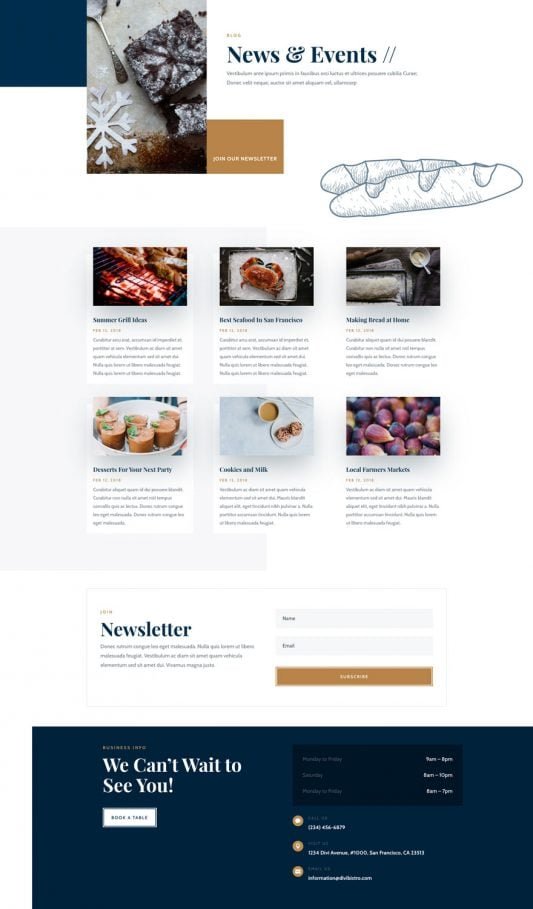
What UX/UI Design Is Best for a Quick and Easy E-commerce Takeaway Food Site?
Our SEO chefs will spice up your Google ranking, claiming top table for searches like “romantic bistro Melbourne” or “casual dinner Perth.” Skip the side-dish obscurity and draw in organic crowds from Canberra’s cultured connoisseurs or the Gold Coast’s sunset suppers!
We’ll season your social media with savory stories on Instagram and Facebook: sizzling kitchen clips, wine-pairing whispers, and guest gratitude posts that tantalize timelines. It’s your recipe for becoming the local legend in scenes from Hobart’s waterfront wonders to Darwin’s dusk delights.
Hungry for hurried reservations? Our Google Ads and Facebook Ads are flavor-focused, luring Aussie food lovers with clever, calorie-conscious campaigns that pack the house and pare down the empty chairs—suited to sizzling bistro belts in Sydney and Melbourne.
We’re your tasty table-turners for triumph, all about results that let you master the menu. Craving a casual confab over virtual vino? Drop by our website—let’s cook up a feast of success for your bistro together!


