

Table of Contents
As a bagel shop owner in Melbourne, leveraging customer reviews can significantly boost your online presence and drive foot traffic. Platforms like Google and Zomato are goldmines for local reviews, showcasing authentic feedback from patrons who love your fresh bagels and cozy atmosphere. Integrating these platforms seamlessly into your website not only builds trust but also improves search engine rankings. In this guide, we’ll explore practical steps to embed Zomato and Google reviews directly onto your site, enhancing credibility and encouraging more visits from nearby customers. Whether you’re tech-savvy or not, these integrations are straightforward and can yield immediate results for your business.
Why Bagel Shops Need Local Review Integrations
Local review platforms play a pivotal role in today’s digital landscape, especially for Melbourne’s competitive food scene. Google Reviews, powered by Google My Business, reaches millions through search results and Maps, while Zomato appeals to foodies seeking detailed ratings and photos of your signature bagels. By embedding these reviews on your website, you create social proof that influences potential customers at the point of decision-making. Studies show that 93% of consumers read reviews before visiting a local business, making integration essential for bagel shops aiming to stand out. Transitioning to implementation, let’s break down the benefits specific to your industry.
Key Benefits for Your Bagel Shop
Integrating reviews enhances user experience by providing fresh, real-time testimonials right on your homepage or menu page. For bagel enthusiasts, seeing rave reviews about your sesame bagels or cream cheese varieties builds excitement before they even arrive. Moreover, these widgets improve SEO as search engines favor content with dynamic, user-generated elements. Zomato’s visual appeal complements bagel shop aesthetics with mouthwatering user photos, while Google’s star ratings boost click-through rates from search results. As we move forward, understanding the platforms will prepare you for smooth integration.
Understanding Google and Zomato Platforms
Google Reviews aggregate feedback from your Google Business Profile, displaying star ratings, snippets, and overall scores. Zomato, popular in Australia for its restaurant discovery features, offers review feeds with detailed critiques and images. Both platforms provide embed codes or APIs tailored for websites, ensuring mobile responsiveness crucial for Melbourne commuters searching for quick bagel bites. With these basics covered, you’re ready to dive into the integration process, starting with Google, the most universal choice.
Integrating Google Reviews Step by Step
Begin by ensuring your Google Business Profile is verified and optimized with high-quality photos of your bagel shop interior and products. Log into your Google My Business account and navigate to the reviews section. To embed reviews, use Google’s Places API or third-party widgets like Elfsight or ReviewWidget, which offer free tiers. Generate an embed code by entering your Place ID—a unique identifier found via Google’s Place ID Finder tool. Copy the iframe code and paste it into your WordPress site’s HTML block via the Gutenberg editor. Customize the widget to show 5-10 reviews, auto-refreshing every few hours for freshness. Test on mobile to confirm responsiveness; for bagel shops, position it near your location map. This setup not only displays ratings but also includes a subtle call-to-action for new reviews, funneling traffic back to Google.
Next, for advanced users, leverage JavaScript snippets. Add a script tag to your site’s header, replacing placeholders with your Place ID. This method allows dynamic loading without full page refreshes, ideal for high-traffic Melbourne bagel outlets during brunch rushes. Tools like PKRank’s custom integration services can handle complex setups, ensuring compliance with Google’s guidelines.
Seamless Zomato Review Integration
Zomato’s integration is equally user-friendly, focusing on visual storytelling perfect for showcasing bagel platters. First, claim and verify your Zomato listing through their partner dashboard. Access the embed widget from the Zomato Restaurant Dashboard under the ‘Widgets’ tab. Select review feed options, customizing the number of reviews and layout to match your site’s branding—perhaps a warm, bakery-inspired theme. Copy the provided iframe or JavaScript code and insert it into your WordPress page using the Custom HTML block. Unlike Google, Zomato emphasizes photos, so highlight user-submitted images of your everything bagels slathered in toppings.
For deeper customization, use Zomato’s API with a developer key obtained from their support. This enables filtering reviews by rating or recency, tailoring content for seasonal promotions like holiday bagel specials. Always check Zomato’s terms to avoid scraping issues, and use responsive embeds for seamless viewing on desktops and phones alike. With both platforms integrated, comparing their features helps optimize your strategy.
Comparison of Google and Zomato Integrations
| Feature | Google Reviews | Zomato Reviews |
|---|---|---|
| API Availability | Places API (Free tier available) | Restaurant API (Key required) |
| Visual Elements | Stars, snippets, basic photos | High-res photos, detailed menus |
| SEO Impact | High (Direct Google synergy) | Moderate (Food discovery focus) |
| Customization Options | Moderate (Widgets, JS) | High (Feeds, filters) |
| Mobile Responsiveness | Excellent | Excellent |
| Update Frequency | Real-time | Near real-time |
This table highlights how Google excels in broad reach and SEO, while Zomato shines in visual engagement—choose based on your bagel shop’s audience. Now, let’s transition to best practices to maximize these integrations.
Best Practices for Optimal Integration
To ensure your integrations perform flawlessly, encourage regular review responses on both platforms, fostering a dialogue that boosts engagement. Place review widgets prominently but non-intrusively, such as beside your menu or testimonials section. Regularly audit embeds for loading speed using tools like Google PageSpeed Insights, as slow widgets deter visitors.
- Respond to every review publicly to show customer care and improve rankings.
- Use schema markup (Review schema) alongside embeds for rich snippets in search results.
- A/B test widget placements to identify high-conversion spots on your site.
- Monitor analytics via Google Analytics events to track review interactions.
- Combine with user-generated content strategies, like photo contests for bagel lovers.
- Partner with local Melbourne digital experts like PKRank for maintenance and scaling.
These tips bridge technical setup with marketing savvy, paving the way for sustained growth.
Overcoming Common Challenges
Challenges like API rate limits or cross-browser compatibility arise, but solutions are straightforward. For Google, upgrade to paid API if exceeding quotas during peak seasons. Zomato embeds occasionally conflict with caching plugins; disable caching for those pages or use lazy loading. Security-wise, sanitize all codes to prevent vulnerabilities. If DIY feels overwhelming, PKRank offers tailored integrations for Melbourne bagel shops, ensuring seamless performance without hassle. With pitfalls addressed, you’re set for lasting success.
In conclusion, integrating Zomato and Google reviews transforms your bagel shop’s website into a trust-building powerhouse. By following these steps, from embed codes to best practices, you’ll captivate Melbourne customers, elevate your online reputation, and increase bookings. Start small, monitor results, and watch your business flourish—your perfectly toasted bagels deserve the spotlight they earn through glowing reviews.
Empower Your Bagel Shop with PKRank’s Tailored Digital Solutions
Hey there, dough dynamo! Whipping up chewy bagels and fresh schmears in Australia’s vibrant foodie scene is a delight, but luring in those hungry crowds? That’s the real rise-and-shine challenge.
At PKRank, we’re all about sprinkling digital marketing magic that’s fun, fuss-free, and flavor-packed for bagel bosses like you—whether you’re toasting classics in Sydney’s multicultural markets, innovating flavors in Melbourne’s cafe crawl, or slinging stacks in Brisbane’s brunch hotspots.
Picture a deliciously designed website baked fresh for your shop, with mouthwatering photo menus of everything bagels, lox-loaded beauties, or vegan twists, plus online ordering and loyalty perks. We’ll keep it crumb-free and mobile-munchable, so foodies from Perth’s fusion eateries to Adelaide’s artisan alleys can grab a bite virtually anytime.
Bagel Shop Website Demo
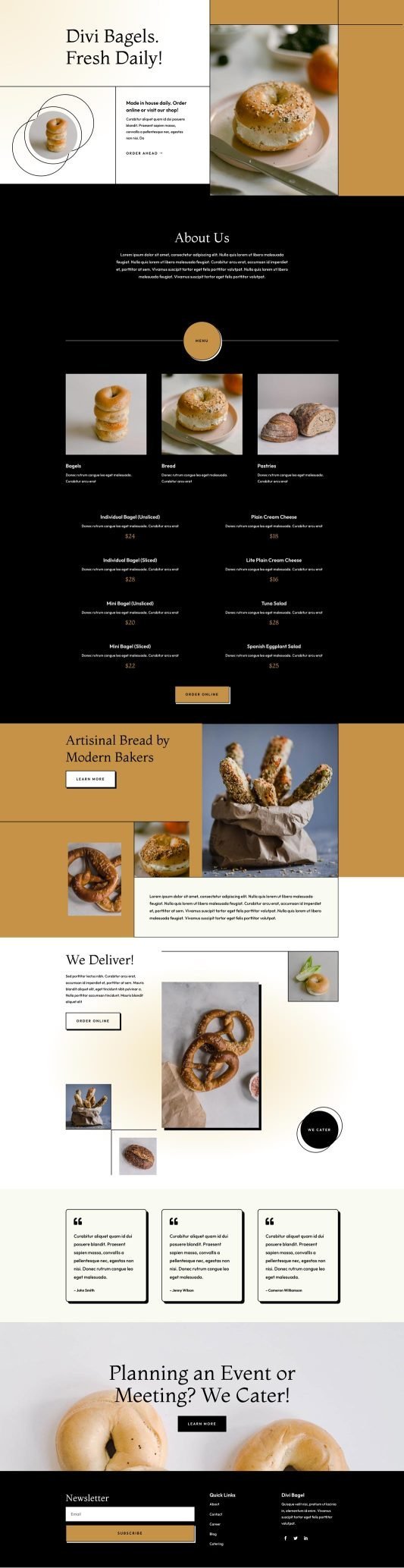
How to Integrate Local Review Platforms (Zomato, Google) Seamlessly into My Website?
Our SEO bakers will knead your Google spot to the top, ensuring you’re the first crave for “best bagels Melbourne” or “bagel delivery Perth.” No more getting buried in the bread aisle—pull in organic foot traffic from Canberra’s coffee chasers or the Gold Coast’s surf-and-smear seekers!
We’ll glaze your social media with tasty vibes on Instagram and Facebook: steamy fresh-out-of-the-oven shots, pairing polls, and customer cream-cheese confessions that spread like wildfire. It’s your way to become the neighborhood nibble in areas from Hobart’s harbor hangs to Darwin’s tropical treats.
Craving quicker queues? Our Google Ads and Facebook Ads are precisely portioned, targeting Aussie appetite alerts with budget-bite setups that boost orders and nix the no-shows—tailor-made for bagel buzz in Sydney and Melbourne.
We’re your sweet sidekicks in sales, all about results that let you focus on the perfect boil. Up for a chat over virtual bagels? Swing by our website—let’s dough this and turn your shop into a breakfast blockbuster together!
Last Updated on March 21, 2026 by PKRank


